 By Graham Fisher
Updated November 2026
If your vtech baby monitor keeps turning off, the cause is often the battery, the power adapter, the range or a setting like auto-standby. This guide compares six VTech models so you can match a unit to how you use it. The selection criteria are battery capacity, reported range, connectivity type, power setup and how well each model fits common overnight and daytime routines. Everything here is based on manufacturer specifications and patterns owners commonly describe, not on any testing we carried out ourselves.
Our top picks at a glance
- 1
 TOP CHOICEBest overallVTech Smart WiFi Baby Monitor VM901View on Amazon
- 2
 TOP CHOICEBest for long nights on batteryVTech Baby Monitor No WiFi, 7" IPS Screen Advanced HQ MaxView on Amazon
- 3
 TOP CHOICEBest budget pickVTech Audio Baby Monitor DM111View on Amazon
- 4
 Best for light sleepersVTech TM8112 Audio Baby MonitorView on Amazon
- 5
 Best for a simple video setupVTech Digital 5" Video Monitor with NightlightView on Amazon
- 6
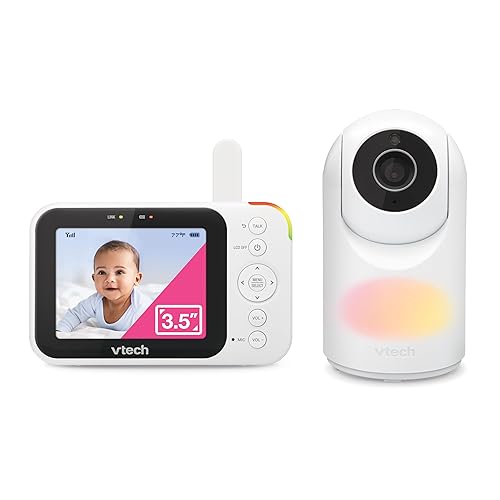 Best for temperature trackingVTech Video Baby Monitor VM4263View on Amazon
Our Top Picks
Quick Comparison
| Product | Best for | Key feature |
|---|---|---|
| VTech Audio Baby Monitor DM111 | Budget audio monitoring | 8-hour rechargeable battery |
| VTech Smart WiFi Baby Monitor VM901 | Checking in from a phone | 1080p camera with app access |
| VTech Baby Monitor 7″ IPS Advanced HQ Max | Long nights on battery | 5000mAh, 12-hour battery |
| VTech TM8112 Audio Baby Monitor | Light sleepers | Glow-on-ceiling night light |
| VTech Digital 5″ Video Monitor | Simple video setup | 5-inch screen with nightlight |
| VTech Video Baby Monitor VM4263 | Temperature tracking | Built-in temperature sensor |
VTech Smart WiFi Baby Monitor VM901
VTech Smart WiFi Baby Monitor – See Your Baby at Home or from Anywhere, Free App, 1080p Camera, 5" Screen, Pan-Tilt-Zoom, Night Vision, Two-Way Talk | VM901
Best for: Checking in on your baby from a phone while away from home.
This model suits parents who want remote viewing and do not mind relying on a home network. Owners who run into shutoff problems often trace them to Wi-Fi drops rather than the unit itself, so a stable router matters here.
Key specs
- 5-inch screen
- 1080p camera
- Pan-tilt-zoom
- Night vision
- Two-way talk
- Free app
Pros
- Remote viewing from anywhere with a connection
- Pan, tilt and zoom for full room coverage
- Two-way talk through the app
Cons
- Depends on Wi-Fi, so network dropouts can look like the monitor turned off
- Needs an app account and setup
Bottom line: Best for parents who want phone access and have a reliable home network.
VTech Baby Monitor No WiFi, 7″ IPS Screen Advanced HQ Max
VTech Baby Monitor No WiFi, 7" IPS Screen, 5000mAh 12Hr Battery, 360° PTZ, 4X Zoom, Night Vision, Night Light, 2-Way Talk, White | Advanced HQ Max
Best for: Long nights on battery when you want to avoid outlet-related shutoffs.
This model has a large battery and works without Wi-Fi, which removes one common source of disconnection. It suits families who want video without a network dependency.
Key specs
- 7-inch IPS screen
- 5000mAh battery, listed at up to 12 hours
- 360° pan-tilt
- 4x zoom
- Night vision and night light
- Two-way talk
Pros
- Large battery reduces dependence on the wall outlet
- No Wi-Fi setup or router reliance
- Large screen for easy viewing
Cons
- Larger footprint than audio-only units
- Battery life depends on screen brightness and use
Bottom line: A strong pick for parents who want video that keeps running through the night without Wi-Fi.
VTech Audio Baby Monitor DM111
VTech Audio Baby Monitor — No Static DECT 6.0, No WiFi, Hack-Proof | 8Hr Battery, Belt Clip, 1000ft Range, 5-Level Sound Indicator | DM111
Best for: A budget audio setup with a long battery and simple controls.
This is a sound-only monitor for parents who mainly need to hear their baby. Its rechargeable battery and belt clip make it easy to carry around the house.
Key specs
- DECT 6.0 digital connection
- 8-hour rechargeable battery
- Listed range up to 1000 feet
- Belt clip
- 5-level sound indicator
Pros
- Simple, no-network design
- Long battery for a single-unit setup
- Belt clip for mobility
Cons
- No video, so you cannot see the baby
- Battery must be recharged regularly to avoid shutdowns
Bottom line: Good for parents who want audio only and a straightforward, low-maintenance unit.
VTech TM8112 Audio Baby Monitor
VTech TM8112 Audio Baby Monitor with Glow-on-Ceiling Starry Night Light, 8-Hour Rechargeable Battery, 1000ft Range & Belt Clip
Best for: Light sleepers who want a soft night light and an audio monitor.
The ceiling glow feature gives a gentle light without a bright lamp, which can help parents who are sensitive to light at night.
Key specs
- Glow-on-ceiling starry night light
- 8-hour rechargeable battery
- Listed range up to 1000 feet
- Belt clip
Pros
- Soft ceiling night light
- Long rechargeable battery
- Portable with a belt clip
Cons
- Audio only
- Battery life drops if the night light is used heavily
Bottom line: A good fit for audio monitoring with a gentle nightlight in the nursery.
VTech Digital 5″ Video Monitor with Nightlight
VTech Digital 5" Video Monitor with Nightlight
Best for: A simple video setup without app or Wi-Fi requirements.
This model offers basic video viewing on a mid-size screen. It suits parents who want to see the baby without managing a network.
Key specs
- 5-inch digital screen
- Built-in nightlight
- Digital video connection
Pros
- Simple setup with no app
- Works without Wi-Fi
- Built-in nightlight
Cons
- Fewer advanced controls than newer models
- Battery and power details should be checked in the manual
Bottom line: A practical choice for straightforward video monitoring at home.
VTech Video Baby Monitor VM4263
VTech Video Baby Monitor with Camera and Audio, 3.5" LCD Screen, Pan-Tilt-Zoom, 2-Way Talk, VOX Mode, Night Light, Lullabies, Soothing Sounds, Temperature Sensor, Long Range, No WiFi: VM4263 (White)
Best for: Parents who want temperature readings and a voice-activated mode.
This model adds a temperature sensor and voice-activated (VOX) mode, which can reduce how often the screen stays on during quiet periods.
Key specs
- 3.5-inch LCD screen
- Pan-tilt-zoom camera
- Two-way talk
- VOX mode
- Night light and lullabies
- Temperature sensor
- No Wi-Fi
Pros
- Temperature sensor for room monitoring
- VOX mode can conserve power
- No network dependence
Cons
- Smaller 3.5-inch screen
- Some features may behave differently depending on settings
Bottom line: A solid choice for parents who want temperature data and power-saving video.
Buying Guide
Battery Capacity and Runtime
Check the listed battery capacity and whether the unit can run on power while charging. Many shutoff complaints happen when a battery is low or aging. Replace batteries when runtime noticeably drops.
Good picks for this: VTech Baby Monitor 7″ IPS Advanced HQ Max, VTech Audio Baby Monitor DM111
Connection Type: Wi-Fi vs. Non-Wi-Fi
Wi-Fi models depend on your router, so dropouts can look like the monitor turned off. Non-Wi-Fi units use a dedicated radio link and avoid that issue, though they lose remote app access.
Good picks for this: VTech Smart WiFi Baby Monitor VM901, VTech Video Baby Monitor VM4263
Power Adapter and Outlet Use
Confirm the adapter is the one specified for your model and plug it into a stable outlet, not a switched or loose one. A failing adapter can cause intermittent power loss.
Good picks for this: VTech Digital 5″ Video Monitor with Nightlight, VTech TM8112 Audio Baby Monitor
Range and Placement
Listed range figures assume open space. Walls, floors and metal objects reduce range. Place the parent unit within the listed range of the baby unit and away from large appliances.
Good picks for this: VTech Audio Baby Monitor DM111, VTech TM8112 Audio Baby Monitor
Auto-Standby and Sleep Settings
Some monitors have power-saving modes such as voice-activated operation or screen timeouts. Review the settings menu, because these features can make a unit appear to switch off when it is simply idle.
Good picks for this: VTech Video Baby Monitor VM4263, VTech Baby Monitor 7″ IPS Advanced HQ Max
Screen Size and Viewing Needs
Larger screens are easier to read in dim rooms but use more battery. Choose the size that matches how often you will look at the screen.
Good picks for this: VTech Digital 5″ Video Monitor with Nightlight, VTech Smart WiFi Baby Monitor VM901
Firmware and Maintenance
Keep the app and firmware updated where the model supports it, and reset the unit if it stops responding. Clean the charging contacts and check cable condition periodically.
Good picks for this: VTech Smart WiFi Baby Monitor VM901, VTech Audio Baby Monitor DM111
FAQ
Why does my VTech baby monitor keep turning off?
The most common causes are a low or aging battery, a loose or failing power adapter, an auto-standby setting, or (for Wi-Fi models) a dropped network connection. Start by checking the battery and adapter, then review the settings.
How do I know if the battery is the problem?
If the unit runs briefly after a full charge and then shuts off, the battery is likely worn. Try running the monitor plugged in to see whether it stays on.
Can a Wi-Fi drop make a VTech monitor look like it turned off?
Yes. On Wi-Fi models, losing the network can stop the video feed and app connection even though the unit itself is still on. Check your router and move the monitor closer if needed.
Does range affect whether the monitor stays on?
Range affects signal quality rather than power directly, but a unit that loses the signal may show a “no connection” state that looks like shutting off. Keep the units within the listed range.
Should I turn off auto-standby or sleep settings?
If you want the monitor to stay active, review the power-saving and screen-timeout options in the settings menu and adjust them to your needs.
When should I contact VTech support?
If the unit keeps shutting off after you have replaced the battery, confirmed the adapter and checked the settings, contact the manufacturer or a qualified repair service. For any electrical concern, consult a professional before continuing to use a damaged adapter.
Conclusion
If your vtech baby monitor keeps turning off, start by checking the battery, adapter and settings before assuming a defect. For phone access, the VTech Smart WiFi Baby Monitor VM901 is a strong option if your network is reliable. For long battery runtime without Wi-Fi, the VTech 7″ IPS Advanced HQ Max fits well. Budget-minded parents who only need sound may prefer the DM111, and light sleepers may like the TM8112. For a simple video setup, consider the VTech Digital 5″ Video Monitor, and for temperature readings the VM4263 is a good match.
For more guidance, see How to Choose a Baby Monitor: 6 Factors to Check Before You Buy and Baby Monitor Placement and Cord Safety. If you are weighing connectivity, Wi-Fi vs Non-Wi-Fi Baby Monitors: Range, Privacy and Security explains the trade-offs.
Sources
- Consumer product safety guidance on nursery electronics and cord safety (cpsc.gov)
- Pediatric recommendations on safe sleep environments and monitoring (aap.org)
- Guidance on battery care and rechargeable battery use (energy.gov)
Related reading
- How to Secure a Wi-Fi Baby Monitor
- Best Video Baby Monitors for Home and Travel: 7 Models Compared
- Baby Monitor Features Explained
- Audio vs Video Baby Monitors
About Graham Fisher
Graham Fisher is part of our editorial team and reviews and edits our baby gear guides, checking product details against manufacturer specifications and owner feedback.