 By Audrey Hayes
Important: a baby monitor is a convenience tool, not a medical device. No monitor prevents Sudden Infant Death Syndrome (SIDS). Follow safe sleep guidance from the American Academy of Pediatrics and the CPSC regardless of which monitor you use.
Baby monitors fall into two broad groups: monitors that stream over your home Wi-Fi to a phone app, and monitors that use a dedicated parent unit with a direct radio connection that does not need the internet. The right choice depends on how you want to check on your baby and how you feel about privacy.
How each type works
- Non-Wi-Fi (local) monitors send audio, or audio and video, from the baby unit directly to a handheld parent unit. They work without an internet connection or app.
- Wi-Fi monitors connect the camera to your home network and stream to an app on your phone, often through the manufacturer’s cloud service. You can usually view from anywhere with an internet connection.
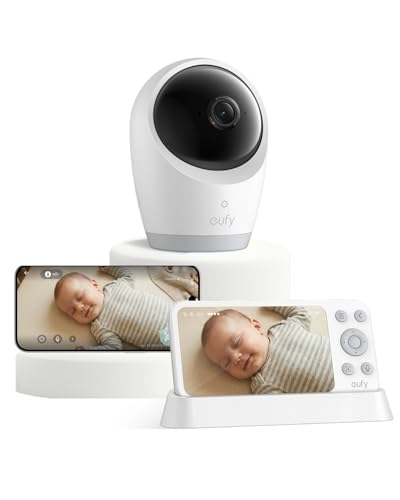
- Hybrid monitors offer both a dedicated parent unit and app access.
Comparison
| Factor | Non-Wi-Fi (local) | Wi-Fi |
|---|---|---|
| Where you can watch | Within the radio range in and around your home | Anywhere with internet |
| Internet dependence | None | Needs working Wi-Fi and the service |
| Viewing device | Dedicated parent unit | Phone or tablet app |
| Privacy exposure | Lower; no account or cloud | Higher; account, app and often cloud servers |
| Extra features | Usually basic | Often recording, alerts, sharing, analytics |
| Ongoing costs | Usually none | Some features may require a subscription |
Range and reliability
Local monitors list a maximum range, usually measured in open space. Walls, floors and interference reduce it in a real home. If you have a large home or plan to use the monitor in the yard, look for range extenders or a monitor whose stated range leaves a comfortable margin. For another angle, check out Manduca Baby Carrier vs Tula: Which Fits Your Baby and Body Best?.
Wi-Fi monitors depend on your router, your internet connection and the manufacturer’s servers. A router reboot, internet outage or service issue can interrupt monitoring. Some Wi-Fi monitors fall back to local viewing; check how a model behaves when the internet goes down.
Privacy and security
Any connected camera in your home can be a privacy risk if it is not secured. For Wi-Fi monitors:
- Use a strong, unique password for the monitor account and enable two-factor authentication if offered.
- Keep the camera’s firmware and the app updated.
- Secure your home Wi-Fi with a strong password and current encryption settings.
- Review the manufacturer’s privacy policy: what is recorded, where it is stored, for how long and who can access it.
- Remove access for anyone you no longer want viewing the camera.
Local monitors avoid cloud accounts, but some still use radio signals that could be received nearby. Monitors described as using encrypted digital transmission are generally harder to intercept than older analog models.
Safe placement
The CPSC has warned about strangulation hazards from baby monitor cords and advises keeping cords at least three feet from any part of the crib, bassinet or play yard, and out of a child’s reach (CPSC safety alert). Never place a monitor inside or on the edge of the crib. Recheck placement as your baby grows and can reach farther.
Features worth considering
- Night vision for viewing in a dark room.
- Two-way talk to soothe your baby from another room.
- Battery life of the parent unit if you will carry it around.
- Multiple cameras if you have more than one child or room.
- Temperature display, useful as a general room reading.
Some monitors advertise breathing or movement tracking. The American Academy of Pediatrics advises against using home cardiorespiratory monitors as a strategy to reduce the risk of SIDS. These products should not replace safe sleep practices.
Who should choose which
- Choose non-Wi-Fi if privacy is a priority, your internet is unreliable or you only need to monitor from inside your home.
- Choose Wi-Fi if you want to check from work or while traveling, share access with other caregivers or use app features, and you are comfortable managing account security.
- Consider audio-only if you mainly want to hear when your baby wakes and do not need video.
Frequently asked questions
Are Wi-Fi baby monitors safe?
They can be used safely when secured with strong passwords, two-factor authentication, updates and a secure home network. If you prefer not to manage those risks, a local monitor avoids internet exposure.
Do I need a video monitor?
Not necessarily. Audio monitors work for many families. Video helps if you want to see whether your baby is settling without entering the room.
Related guides
About Audrey Hayes
Audrey Hayes is part of our editorial team and reviews and edits our baby gear guides, checking product details against manufacturer specifications and owner feedback.