 By Graham Fisher
Updated November 2026
If your motorola baby monitor won’t pair 2nd camera, the cause is usually a mismatch between the camera, the parent unit, and the pairing method rather than a broken device. This list compares five Motorola two-camera models based on manufacturer specifications, brand reputation, and common owner feedback patterns. The selection criteria were pairing approach (non-Wi-Fi versus Wi-Fi), screen size, pan-tilt-zoom control, range, night vision, and how straightforward each model is to set up with a second camera.
Our top picks at a glance
- 1
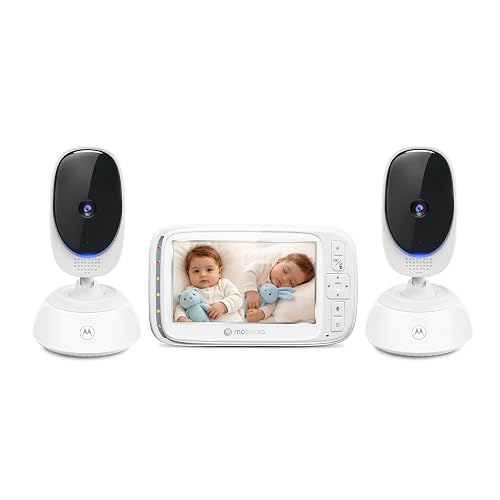 TOP CHOICEBest overallMotorola Nursery No WiFi Video Baby Monitor with 2 Cameras and Audio,View on Amazon
- 2
 TOP CHOICEBest for app-based controlMotorola Nursery WiFi Baby Monitor, 2 Cameras, 5" Screen, Pan Tilt ZooView on Amazon
- 3
 TOP CHOICEBest budget pickAmazon Renewed MBP483XL-2 Dual Camera 4.3" Video Baby Monitor with DigView on Amazon
- 4
 Best for a single-camera upgrade pathMotorola Nursery Baby Monitor with Camera and Audio, Portable VM36XL WView on Amazon
- 5
 Best for a straightforward two-camera setupMotorola Nursery PIP1610-2 Video Baby Monitor, 2 Cameras, No WiFi, No AppView on Amazon
Our Top Picks
Why a Second Camera Fails to Pair
Before comparing models, it helps to understand the most common reasons a second camera won’t connect. Owners frequently report that the camera is still bound to a previous parent unit, that the camera is out of range during the pairing step, or that the system is in the wrong pairing mode. Power cycling the camera and parent unit, moving the camera within a few feet of the parent during pairing, and confirming the camera is registered to the correct channel often resolve the problem. Manufacturers typically specify that each camera must be paired one at a time, not simultaneously. If the second camera still fails after these steps, contacting the manufacturer’s support team is the next step.
Our Top Picks
The table below summarizes the five models in this comparison.
| Product | Best for | Key feature |
|---|---|---|
| Motorola Nursery No WiFi Video Baby Monitor (VM75-2) | Parents wanting a non-Wi-Fi two-camera system | 2 cameras, 5” split screen, 1000ft range |
| Motorola Nursery WiFi Baby Monitor (VM85-2) | Parents who want app-based viewing | Wi-Fi connectivity with two cameras |
| Amazon Renewed MBP483XL-2 Dual Camera Video Baby Monitor | Budget-conscious buyers | Dual camera with digital zoom and two-way audio |
| Motorola Nursery Baby Monitor (VM36XL) | Parents starting with one camera and adding another later | Touchscreen display and app connection |
| Motorola Nursery PIP1610-2 Video Baby Monitor | Simple two-camera setups without an app | 2 cameras, no Wi-Fi, no app required |
Motorola Nursery No WiFi Video Baby Monitor with 2 Cameras and Audio, 5” Split Screen, Pan-Tilt-Zoom, Night Vision, 2-Way Talk, Long Battery Life, 1000ft Range, Temperature Sensor, VM75-2 (2026 Model)
Motorola Nursery No WiFi Video Baby Monitor with 2 Cameras and Audio, 5” Split Screen, Pan-Tilt-Zoom, Night Vision, 2-Way Talk, Long Battery Life, 1000ft Range, Temperature Sensor, VM75-2 (2026 Model)
Best for: Best overall, especially for parents who want two cameras without relying on Wi-Fi
This model suits families who want a dedicated parent unit with a split-screen view of two rooms and prefer that the video feed not depend on a home network.
Key specs:
- Two cameras included
- 5-inch split-screen display
- Pan, tilt, and zoom control
- Night vision
- Two-way talk
- Temperature sensor
- Listed range of 1000 feet
Pros:
- Split screen makes it easy to watch two rooms at once
- Non-Wi-Fi design avoids network setup during pairing
- Pan-tilt-zoom gives flexible viewing angles
Cons:
- No app means viewing is limited to the parent unit
- Larger parent unit may take more space on a nightstand
Bottom line: A strong pick for parents who want a reliable two-camera system and do not need remote phone viewing.
Motorola Nursery WiFi Baby Monitor, 2 Cameras, 5″ Screen, Pan Tilt Zoom, Two-Way Talk, Night Vision, Temperature Alert, 1000ft Range, VM85-2 (2026 Upgrade)
Motorola Nursery WiFi Baby Monitor, 2 Cameras, 5" Screen, Pan Tilt Zoom, Two-Way Talk, Night Vision, Temperature Alert, 1000ft Range, VM85-2 (2026 Upgrade)
Best for: Best for app-based control
This model fits parents who want to check on the nursery from a phone while away from home, and who are comfortable setting up a home Wi-Fi network.
Key specs:
- Two cameras included
- 5-inch screen
- Pan, tilt, and zoom
- Two-way talk
- Night vision
- Temperature alert
- Listed range of 1000 feet
Pros:
- Wi-Fi connectivity enables remote viewing
- Temperature alerts add an extra monitoring layer
- Pan-tilt-zoom on both cameras
Cons:
- Pairing and setup depend on a stable home network
- Wi-Fi models raise more privacy considerations than local-only systems
Bottom line: Choose this if remote viewing matters more to you than a network-free design.
Amazon Renewed MBP483XL-2 Dual Camera 4.3″ Video Baby Monitor with Digital Zoom and Two Way Audio (Renewed)
Amazon Renewed MBP483XL-2 Dual Camera 4.3" Video Baby Monitor with Digital Zoom and Two Way Audio (Renewed)
Best for: Best budget pick
This renewed option suits buyers who want a dual-camera setup at a lower entry point and are comfortable with refurbished equipment.
Key specs:
- Two cameras
- 4.3-inch display
- Digital zoom
- Two-way audio
Pros:
- Lower-cost route to a two-camera system
- Digital zoom for closer views
- Two-way audio for soothing from the parent unit
Cons:
- Renewed condition means checking the seller’s return policy
- Smaller screen than the 5-inch models
Bottom line: A sensible pick for budget-focused families who accept renewed equipment and a smaller display.
Motorola Nursery Baby Monitor with Camera and Audio, Portable VM36XL WiFi HD Camera, Touchscreen Display, App Connected, Long Range, Night Vision
Motorola Nursery Baby Monitor with Camera and Audio, Portable VM36XL WiFi HD Camera, Touchscreen Display, App Connected, Long Range, Night Vision
Best for: Best for a single-camera upgrade path
This model works well for parents who begin with one camera and may add a second later, since the touchscreen and app features carry the system’s controls.
Key specs:
- HD camera with Wi-Fi connectivity
- Touchscreen display
- App connection
- Night vision
- Long range
Pros:
- Touchscreen interface is intuitive for many users
- App connection supports remote viewing
- HD video quality
Cons:
- Pairing a second camera depends on the app and network setup
- Listing does not clearly confirm multi-camera support in the same way as the two-camera kits
Bottom line: Pick this if you prefer an app-first system and plan to start with one camera. Confirm multi-camera compatibility before buying.
Motorola Nursery PIP1610-2 Video Baby Monitor, 2 Cameras, No WiFi, No App
Motorola Nursery PIP1610-2 Video Baby Monitor, 2 Cameras, No WiFi, No App
Best for: Best for a straightforward two-camera setup
This model suits parents who want two cameras with no app and no network requirements, so pairing involves only the devices themselves.
Key specs:
- Two cameras
- No Wi-Fi
- No app required
Pros:
- No network setup to troubleshoot
- Simple, local-only operation
- Two cameras included
Cons:
- No remote phone viewing
- Fewer advanced features than the Wi-Fi models
Bottom line: A good choice for families who want a simple system that avoids Wi-Fi pairing issues altogether.
Buying Guide
Connectivity: Non-Wi-Fi Versus Wi-Fi
The single biggest factor in whether a second camera pairs smoothly is how the system connects. Non-Wi-Fi monitors use a dedicated radio link between camera and parent unit, which removes router settings from the equation. Wi-Fi models add app control but depend on your network, password, and router placement. If pairing has already failed, switching to a non-Wi-Fi design is often the fastest fix.
Good picks for this: Motorola Nursery No WiFi Video Baby Monitor with 2 Cameras and Motorola Nursery PIP1610-2 Video Baby Monitor
Number of Cameras and Pairing Order
Confirm that the model you buy explicitly supports two cameras to one parent unit. Pair one camera at a time, keeping the second camera powered off until the first is connected. Manufacturers generally describe a short pairing window after powering on each camera, so have the parent unit in pairing mode before you start.
Good picks for this: Motorola Nursery WiFi Baby Monitor and Motorola Nursery No WiFi Video Baby Monitor with 2 Cameras
Screen Size and Split-View Display
A 5-inch split screen shows two rooms side by side and makes it easier to confirm that both cameras are active. Smaller displays, such as 4.3 inches, can feel cramped for two feeds. Check that the parent unit can switch between cameras or display both simultaneously.
Good picks for this: Motorola Nursery No WiFi Video Baby Monitor with 2 Cameras and Amazon Renewed MBP483XL-2 Dual Camera Video Baby Monitor
Range and Placement
Listed ranges such as 1000 feet are measured under manufacturer conditions, and walls, floors, and interference reduce real-world distance. Place each camera where it has a clear line of sight to the parent unit’s location, and keep the parent unit away from metal objects and large appliances. Keep cameras out of reach of the crib, following safe placement guidance.
Good picks for this: Motorola Nursery WiFi Baby Monitor and Motorola Nursery Baby Monitor with Camera and Audio
Pan, Tilt, and Zoom Features
Pan-tilt-zoom lets you adjust the camera angle without entering the room. This matters when a second camera covers a different area, such as a play corner or a second sleeping space. Check whether zoom is optical or digital, since digital zoom reduces image sharpness.
Good picks for this: Motorola Nursery No WiFi Video Baby Monitor with 2 Cameras and Motorola Nursery WiFi Baby Monitor
Battery Life and Power Setup
Parent units typically run on rechargeable batteries that are useful during power outages, but battery life varies with screen brightness and whether the unit is in use constantly. Cameras usually require a wall outlet. Keep all power cords out of reach of the crib, and mount cords securely.
Good picks for this: Motorola Nursery No WiFi Video Baby Monitor with 2 Cameras and Motorola Nursery Baby Monitor with Camera and Audio
Renewed Versus New Equipment
Renewed products can offer a lower entry point, but condition, warranty, and included accessories differ by seller. Read the listing carefully, check the return window, and confirm that the camera and parent unit are the matched set described.
Good picks for this: Amazon Renewed MBP483XL-2 Dual Camera Video Baby Monitor and Motorola Nursery PIP1610-2 Video Baby Monitor
FAQ
Why won’t my second Motorola camera pair with the parent unit?
The most common causes are that the second camera is still bound to another parent unit, the camera is too far from the parent during pairing, or the parent unit is not in pairing mode. Power off all cameras, power on the parent unit, and then pair one camera at a time while standing close to the parent.
Do I need to reset the first camera before adding the second?
Often, yes. Manufacturers generally recommend keeping the first camera active and pairing the second one separately, but if the parent unit already recognizes the first camera, adding the second should not require a full reset. If pairing still fails, check the instruction manual for the specific reset procedure for your model.
Can a Wi-Fi model be used without a home network?
Wi-Fi models generally need a network for app features, but the parent unit can often still display video locally. Check the specific model’s manual for how it behaves without internet access.
Is a non-Wi-Fi monitor more reliable for pairing?
Non-Wi-Fi systems avoid router-related pairing steps, which removes one common source of failure. They do not offer remote phone viewing, so the trade-off depends on your priorities.
How far apart can the cameras be from the parent unit?
Listed ranges such as 1000 feet are manufacturer figures measured under ideal conditions. Indoor walls and interference reduce real distance, so test the signal in your home before permanently mounting cameras.
Can I add a third camera later?
Most two-camera kits are designed for two cameras to one parent unit. Check the manufacturer’s listing before buying extra cameras, since compatibility varies by model.
Should I contact support if pairing still fails?
Yes. If the steps in your manual do not resolve the issue, contact the manufacturer with your model number and the exact error or behavior you see. Support can confirm whether the camera or parent unit may need replacement.
Conclusion
If your motorola baby monitor won’t pair 2nd camera, start by checking whether a non-Wi-Fi design would remove network-related steps. The Motorola Nursery No WiFi Video Baby Monitor with 2 Cameras suits parents who want a dedicated split-screen system, while the Motorola Nursery WiFi Baby Monitor suits families who want app viewing. The renewed Amazon option fits budget-focused buyers, the VM36XL suits those who plan to start with one camera, and the PIP1610-2 is a simple two-camera choice without an app. Follow the pairing steps one camera at a time, and consult the manufacturer if problems continue.
Sources
- Consumer safety guidance on baby monitor cords, placement, and product recalls (cpsc.gov)
- Pediatric recommendations on safe sleep environments and monitor use (aap.org)
- Standards information on wireless communication and device interoperability (nist.gov)
Related reading
- Baby Monitor Camera on Phone: A Step-by-Step Setup Guide (2026)
- 7 Best Victure Baby Monitors with Camera Models for Parents (2026)
- Baby Won't Sleep in Carrier Anymore? 6 Fixes That Work (2026)
- Wi-Fi vs Non-Wi-Fi Baby Monitors: Range, Privacy and Security
- How to Secure a Wi-Fi Baby Monitor
- How to Choose a Baby Monitor: 6 Factors to Check Before You Buy
- Best Video Baby Monitors for Home and Travel: 7 Models Compared
About Graham Fisher
Graham Fisher is part of our editorial team and reviews and edits our baby gear guides, checking product details against manufacturer specifications and owner feedback.